PC gameplay
On a computer gnomble plays like any first-person shooter: mouse to look and shoot, keys to move. Every key can be rebound. This page lists the defaults and the tricks that are easy to miss; the How to play guide covers the menus, modes and items.
The mouse
When a match starts the game asks you to click once. That click captures the mouse (pointer lock) so it can turn the camera without leaving the page. Press ESC to release it and open the pause menu; click the game to grab it again.
| Input | Action |
|---|---|
| Move the mouse | Look. Sensitivity and a separate scope sensitivity are in settings. |
| Left button | Fire, or swing the dagger, or use / throw the selected item. |
| Right button | Aim down the sights. When you are holding a block stack in a building match it places a block instead. |
| Scroll wheel | Cycles through the hotbar. |
Keys
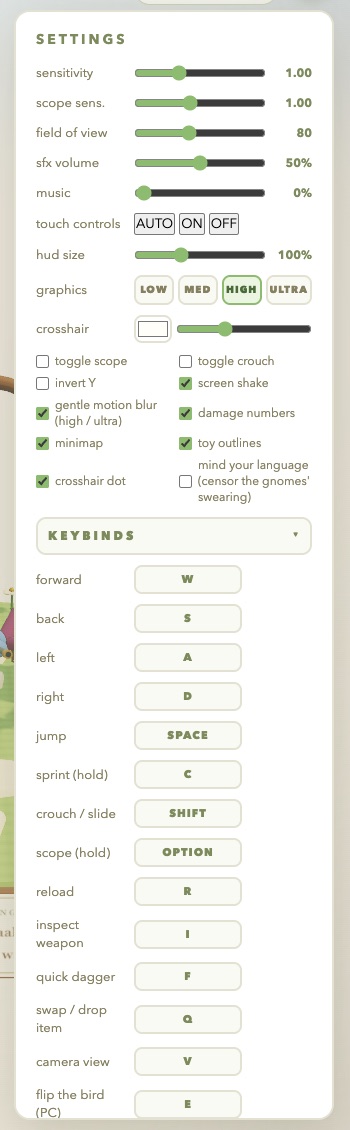
Defaults on a Mac show OPTION where a PC shows ALT; everything else is the same. Rebind anything in settings under Keybinds: click a key and press the new one.
| Key | Action |
|---|---|
| W A S D | Move |
| SPACE | Jump |
| C | Sprint (hold). Double-tapping forward also sprints. |
| SHIFT / CTRL | Crouch. Crouch while sprinting to slide. |
| ALT / OPTION | Scope (hold). Right mouse button always works too. |
| R | Reload |
| 1 to 6 | Hotbar slots: primary, pistol, dagger, three item slots. |
| F | Quick dagger swing without switching weapons |
| Q | Swap primary, or drop the held item |
| I | Inspect weapon |
| V | Camera view |
| E | Flip the bird |
| TAB | Scoreboard (hold) |
| T / ENTER | Open chat. Enter sends. |
| ESC | Pause menu / release the mouse |
Movement
Hold C or double-tap W. Sprinting widens your crosshair and tucks the weapon; you cannot aim down sights while sprinting.
Press crouch while sprinting on the ground. You drop low and keep your speed for a moment, which is the fastest way around a corner.
Tightens spread and makes you a smaller target. Set it to toggle in settings if holding is uncomfortable.
Clears blocks and low walls. Bounce shrooms send you much higher. Your aim is widest in the air.
Combat
Every gun has hip spread and aimed spread, recoil that climbs as you hold the trigger, and damage that falls off with distance. Headshots multiply damage on every weapon. A few habits that pay off:
- Tap the AR in short bursts at range; hold it up close. Its spread blooms the longer you hold.
- The STUB is a one-shot kill at close range and nearly useless past a few metres. Move in, then fire.
- The SR rewards patience: scope in with ALT or the right button, hold still, and go for the head. Its reload is the slowest in the game.
- Your pistol is faster than a reload when the primary runs dry. Swap with 2, swap back with 1.
- F swings the dagger from any weapon. Behind someone, the stab does far more.
- Select an item slot and left-click to use it; throwables go where you are looking. Q drops a held item you do not want.
When you die you respawn in about two seconds. Press 1, 2 or 3 on the death screen to change your primary for the next life.
Camera, chat and the emote
V cycles first person, third person from behind, and third person from the front. Shots still come from your gun in every view.
T or ENTER opens the box, ENTER sends, ESC cancels. The resident gnomes in the FFA garden reply to what you type, rarely kindly. A MENTIONED YOU pill marks lines that @ you.
Hold TAB for kills, deaths, K/D and streaks. Your accuracy for the match is at the bottom.
E raises your gnome's middle finger for a moment, in first person for you and on your character for everyone else. Any click or hotbar key drops the hand instantly, so it never gets in the way of a fight. Bots use it on you too.
In matches with building on, hold a block stack and place blocks with the right button. Blocks can be shot down.
The gnomes swear constantly. If you want it starred out on your screen, turn on mind your language in settings.
Settings that matter on PC
| Setting | Why you might change it |
|---|---|
| Sensitivity | Lower for precise SR play, higher if you play at a low mouse DPI. |
| Scope sens. | Applied while aiming down sights, on top of sensitivity. |
| Field of view | Wider shows more of the garden at the cost of smaller targets. |
| Graphics | Low, medium, high or ultra. Drop it if your frame rate dips; the score strip shows fps. |
| Motion blur | Only on high and ultra. Off if it bothers you. |
| Toggle scope / toggle crouch | Tap to toggle instead of holding. |
| Crosshair | Colour, size, and whether it has a centre dot. |
| Keybinds | Every action above, rebindable. |