How to play gnomble
gnomble is a small first-person arena shooter with garden gnomes. It runs in the browser, on a computer or a phone, with nothing to install. This page walks through the landing page, starting a match, what you see in a round, and how coins and the wardrobe work.
The landing page
Everything starts here. Type a gnome name, then pick how you want to play. The left column is the menu; the gnome diorama on the right is decoration.
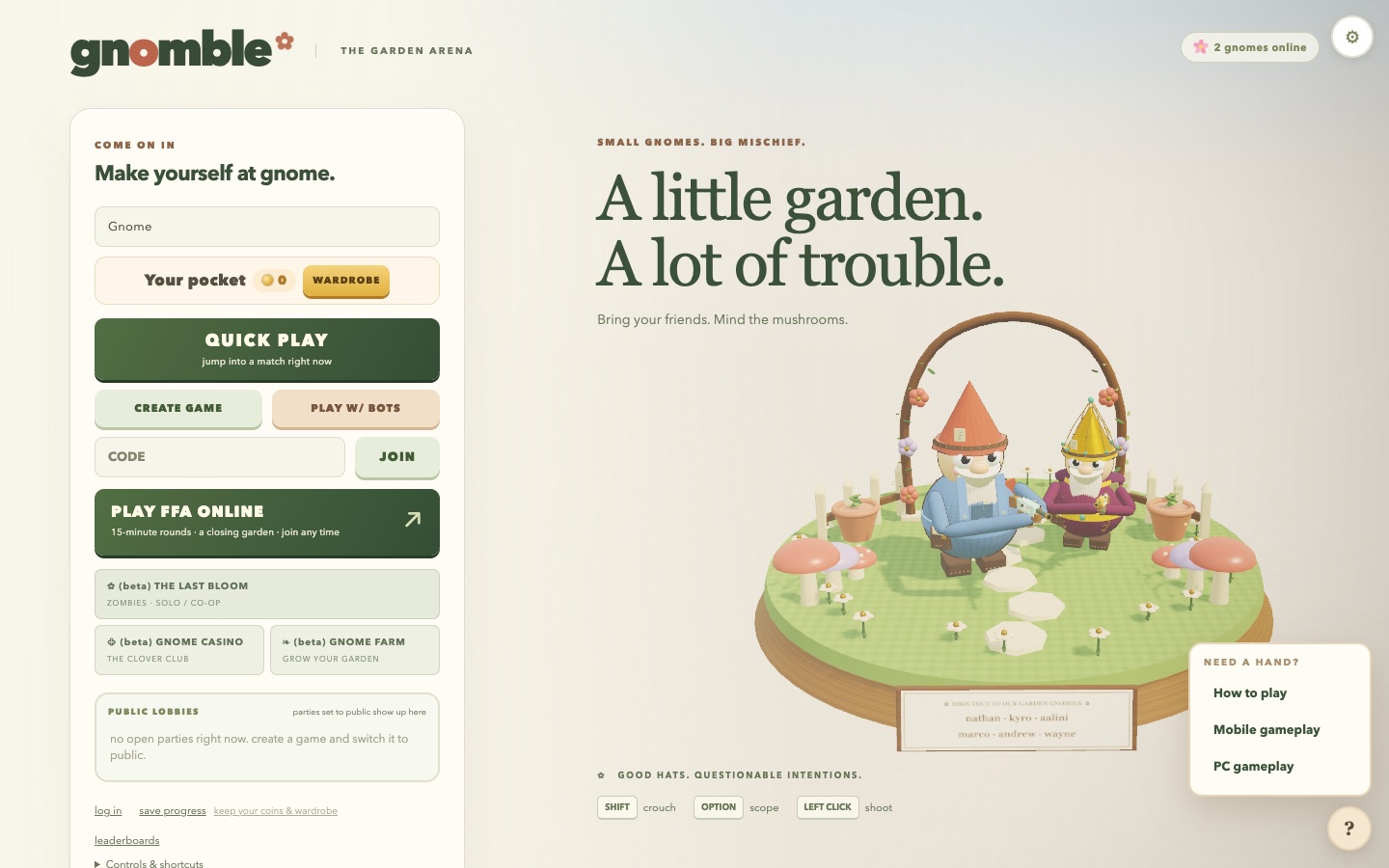
- 1Gnome name. What other players see in the lobby, the score strip and chat. Up to 14 characters.
- 2Your pocket. Your coin balance and the Wardrobe button. Coins buy hats, beards, outfits, accessories and weapon skins.
- 3Quick Play. The fastest way in: a fresh lobby with one bot already waiting, so you can start at once or invite friends first.
- 4Create game / Play w/ bots. Create opens a lobby with a shareable code. Play w/ bots does the same and fills it with bots.
- 5Code and Join. Type a five-letter code from a friend and press Join. A copied lobby link works too.
- 6Play FFA online. The persistent public garden: 15-minute rounds, a closing bramble wall, and resident gnomes who never leave. Join any time.
- 7Beta games. The Last Bloom (zombies), the Gnome Casino and the Gnome Farm. Separate worlds, same account and coins.
- 8Public lobbies. Lobbies whose host switched them to Public show up here. Click one to join.
- 9Log in / save progress. You can play as a guest. An account keeps your coins and wardrobe across devices.
- 10Gnomes online. How many players are on the site right now.
- 11Settings. Sensitivity, field of view, graphics, crosshair, keybinds and more. Also available mid-match.
- 12Help. Opens this guide and the platform guides.
Starting a game
Creates a lobby with one bot already in it. Press START VS BOTS to play immediately, or share the code and start when your friends arrive.
An empty lobby you host. Keep it Private (code or link only) or switch it to Public so it appears in Public lobbies on the landing page.
A lobby stocked with bots. Add or remove them with the add a bot button and each row's remove link.
Enter a friend's five-letter code and press Join. You land in their lobby; the host picks the mode and starts the match.
No lobby at all. You drop straight into the shared garden mid-round with everyone else who is there.
Pick any open party from the list. Public lobbies are visible to everyone on the site.
The lobby
The host sets everything here. Other players see the choices update live and wait for the start button.
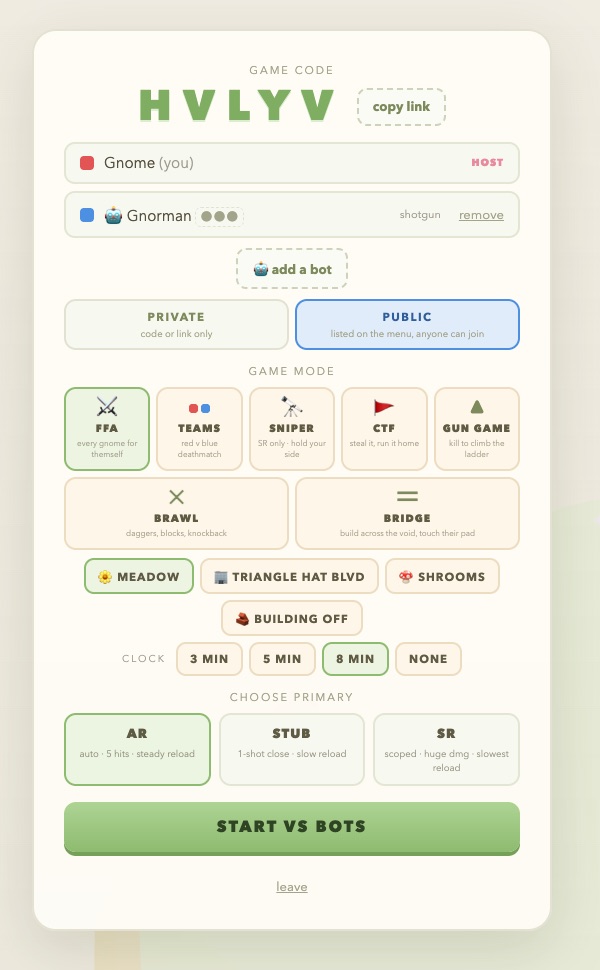
- 1Game code. Read it out or press copy link to share a link that drops people straight into this lobby.
- 2Players. Everyone in the party with their colour. Bots show a robot icon and their weapon; remove them from their row or add more with add a bot. There is no cap on players or bots.
- 3Private or Public. Public lists the lobby on the landing page for anyone to join.
- 4Game mode. Seven modes, described below.
- 5Map. Meadow, Triangle Hat Blvd or Shrooms.
- 6Building. A toggle for any mode: players can place and destroy blocks during the match.
- 7Clock. 3, 5 or 8 minutes, or no clock at all (the match runs until the kill target).
- 8Primary weapon. AR, STUB or SR. You can swap after each death from the respawn screen.
- 9Start. Only the host sees it. The match begins with a short countdown.
Modes and maps
| Mode | How it plays |
|---|---|
| FFA | Every gnome for themself. Most kills when the clock runs out wins, or first to the kill target. |
| Teams | Red versus blue deathmatch. Team kills are pooled. |
| Sniper | Everyone carries only the SR and each team holds its own half of the map. |
| CTF | Steal the other team's flag and run it home, three captures to win. Killing a carrier hands the flag to the killer. An optional Crates toggle gives each team a supply crate of defensive gear: turrets, landmines and a remote-controlled bomb car. |
| Gun Game | Every kill moves you up a weapon ladder. First to the top wins. |
| Brawl | Daggers, blocks and knockback. No guns. |
| Bridge | Build across the void and touch the other team's pad. |
A seeded garden with pastel blocks, mushrooms and long grass. Different every match.
A town block built around a terrace courtyard, with stairs and a cantilevered plaza.
A forest of giant mushrooms. Vertical fights and long sightlines under the caps.
In the match
The round opens with a countdown and the name of the map. After that, everything you need is on the edges of the screen.
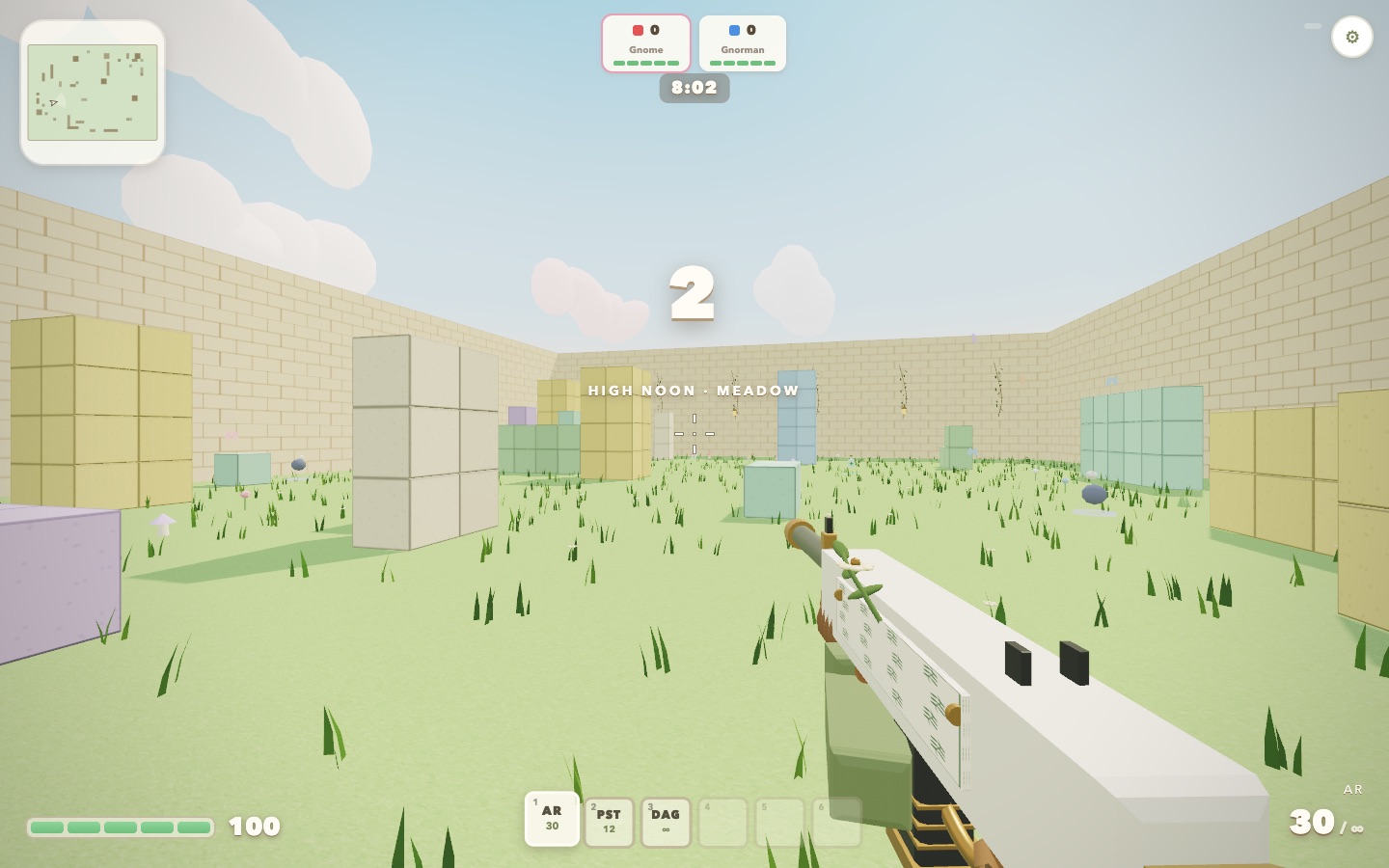
- 1Minimap. Your position and heading, nearby players, drops and objectives. Gunfire pings enemies on it for a moment.
- 2Score strip. Kills and health for each player or team. In the FFA garden it shows the top three and your own rank.
- 3Clock. Time left in the round.
- 4Crosshair. It widens while sprinting, jumping or spraying. Headshots do extra damage with every gun.
- 5Hotbar. Slot 1 is your primary, 2 the pistol, 3 the dagger, 4 to 6 hold items you pick up. Ammo counts sit under each weapon.
- 6Health. 100 at spawn. Health items and potions restore or protect it.
- 7Ammo. Rounds in the magazine and in reserve for the weapon you are holding.
- 8Chat and kill feed. Messages from players and the resident gnomes appear bottom-left; kills scroll top-right. When a gnome mentions you, a MENTIONED YOU pill marks the line.
- 9Settings. Available at any time without leaving the match.
Dying and coming back
When you go down, the screen shows who got you and the hits that did it, and you respawn a couple of seconds later. While you wait you can swap your primary weapon for the next life: press 1, 2 or 3, or tap the weapon buttons on a phone.
Weapons
| Weapon | Slot | Character |
|---|---|---|
| AR | 1 | Automatic rifle. Five body hits to kill, steady reload, the all-round choice. |
| STUB | 1 | Shotgun. One shot up close, weak at range, slow reload. |
| SR | 1 | Scoped rifle. Huge damage per shot, slowest reload. Hold the scope key to aim. |
| PST | 2 | Pistol. Always with you, quick to draw when the primary runs dry. |
| DAG | 3 | Dagger. A quick swing from any weapon with the melee key; a stab from behind does far more. |
Every gun models spread, recoil and damage falloff. Crouching tightens spread, sprinting and jumping widen it, and aiming down the sights narrows it most of all.
Items and supply drops
Items lie around the map and fall from supply drops during the round (the HUD announces one). Walk over an item to pick it up into slots 4 to 6, select the slot, then fire to use or throw it. Some of the things you will find:
Drink: +60 health.
+50 health and iron skin for 14 seconds.
Regenerate 4 health a second for 18 seconds.
Blocks sightlines for 8 seconds.
A frag: 70 damage at the centre, 15 at the edge, and flowers.
Blinds anyone looking at it within 14 metres.
Step on it, it goes boom. Kills by traps return flags home in CTF.
Auto-fires at anyone but you.
Sticks whoever it hits: 40% slower for 3 seconds.
Cast the hook; whoever it lands on gets yanked.
Throw it, be where it lands.
Nearly unseeable for 12 seconds. Swinging shows you for a moment.
Two thirds the size, harder to hit, 15% faster, 18 seconds.
Timed buffs: faster, higher jumps, harder melee, less damage taken.
A placeable trampoline. Anyone can use it.
+20 blocks for matches with building on.
Coins, straight into your pocket.
Barely hurts. Shoves plenty.
The FFA garden
Play FFA online puts you in one shared garden that never closes. Rounds last 15 minutes with a short break between them, and partway through each round the brambles start closing in from the edges: stay inside the marked zone or take damage. Ten resident gnomes live there and keep playing whether or not anyone is watching.
They also talk. A lot. The residents chat with each other, argue, hold grudges, get philosophical, and are relentlessly rude to human players, with plenty of swearing. That is the joke, not a bug. If you would rather not read it, turn on mind your language in settings and the swearing is starred out on your screen. When a gnome @mentions you, the line is marked with a MENTIONED YOU pill so it is easy to spot.
Coins and the wardrobe
You earn coins for every round you finish and by picking up coin purses in matches. Coins buy cosmetics only; nothing in the wardrobe changes how a gnome fights.
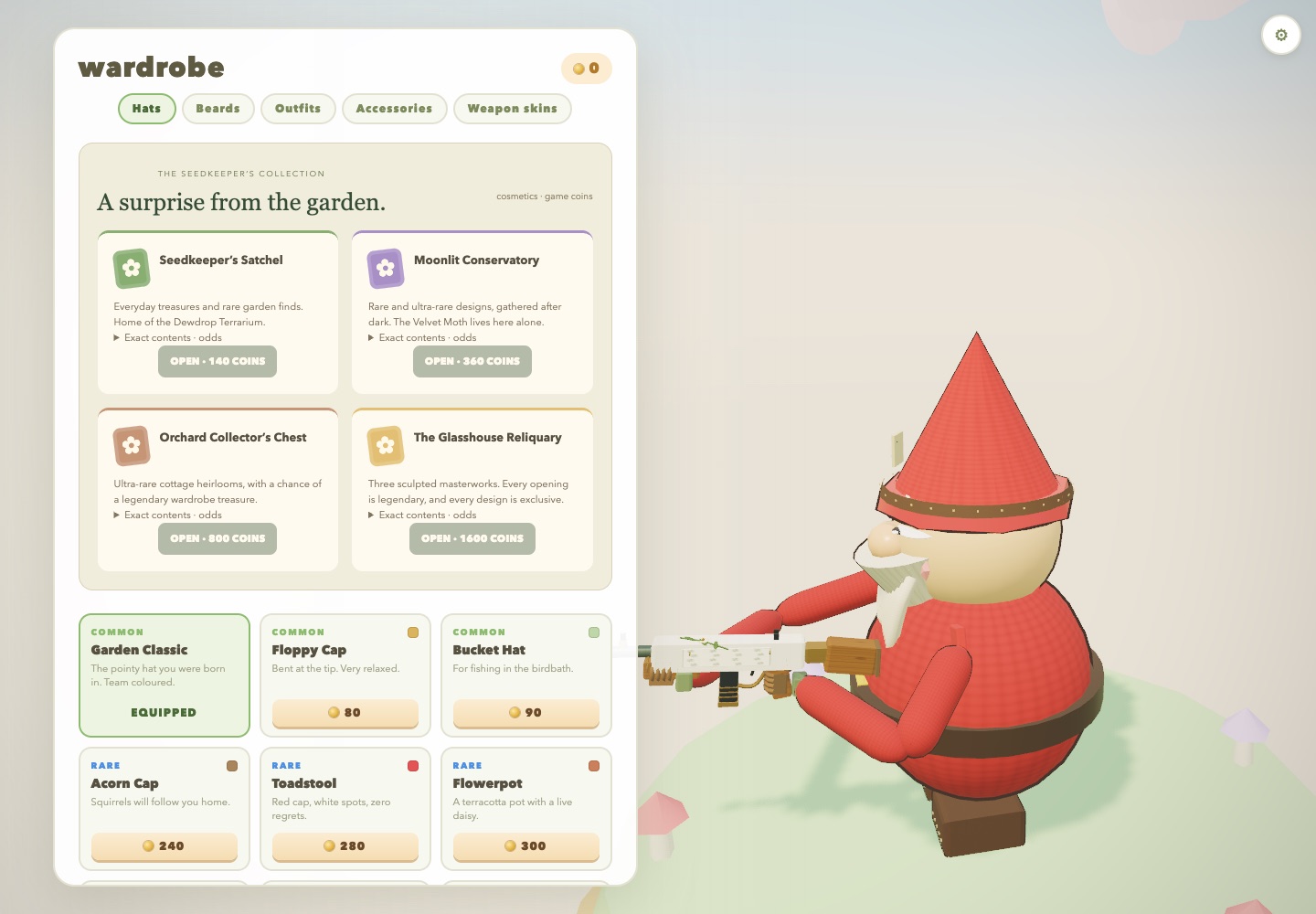
- 1Coins. Your balance, also shown on the landing page.
- 2Categories. Hats, beards, outfits, accessories and weapon skins. Team colours are kept on team items.
- 3Cases. Four parcels at 140, 360, 800 and 1600 coins. Each lists its exact contents and odds before you open it; the priciest one is always legendary.
- 4Items. Buy an item once and it is yours to equip any time. Rarity runs common, rare, ultra rare, legendary.
Settings
The gear in the top-right corner opens settings on the landing page and during a match.
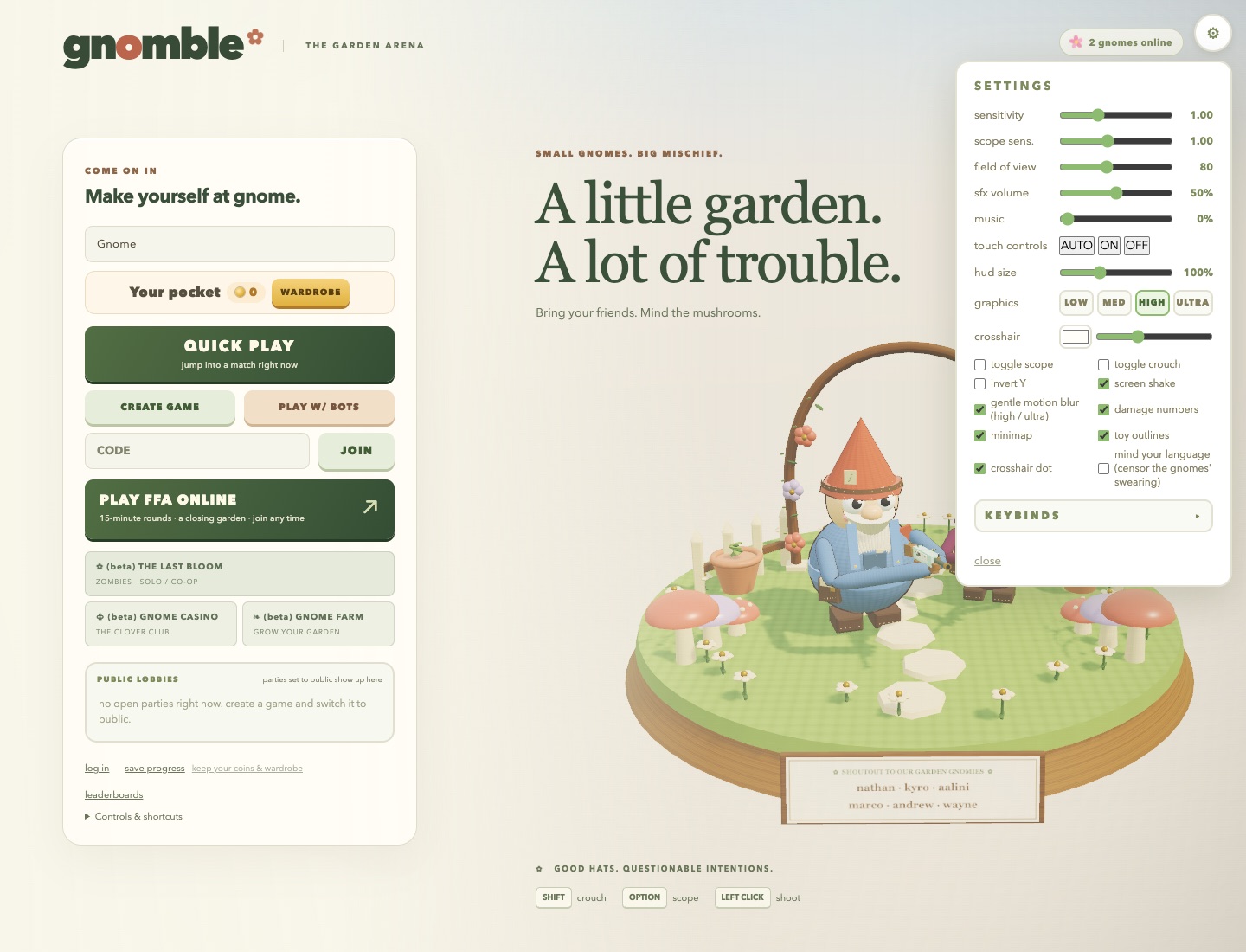
- 1Look. Mouse or touch sensitivity, a separate scope sensitivity, and field of view from narrow to wide.
- 2Sound. Effects volume and music. Music is off by default.
- 3Touch controls. Auto detects phones and tablets; force them on or off.
- 4Graphics. Low to ultra. Phones default to medium.
- 5Crosshair. Colour, size and a centre dot.
- 6Toggles. Toggle versus hold for scope and crouch, invert Y, screen shake, motion blur, damage numbers, minimap, toy outlines, and mind your language.
- 7Keybinds. Every action can be rebound on a computer. See the PC guide.
Beta games
A zombies campaign, solo or co-op. You play the last scientist sealed in a lab; break out, work the radio, and fight through eight chapters of a rewilded town.
The Clover Club: slots, roulette, dice, cards and hi-lo, played with your game coins.
Grow your garden between matches.
All three share your name, account and coin balance with the arena.